 Bug Report Template
Please fill in all fields below to help us understand and resolve the issue effectively.
Platform: Android
(Android / iOS)
Game Version: 3.3
(visible at the left bottom)
Airport:BKK
(e.g. INN, PRG, BRI…)
Description of the Bug:
What happened? What did you expect to happen instead?
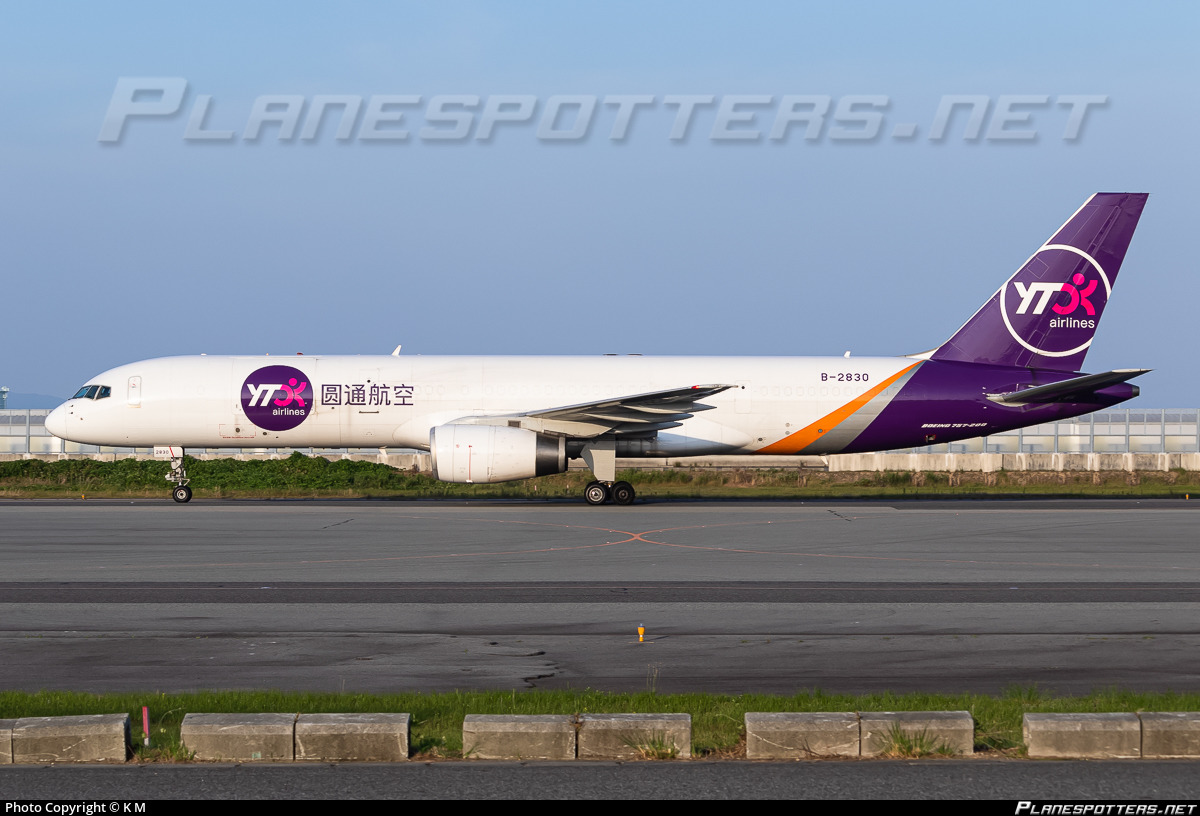
① On the left side of the YTO Cargo Airlines B752CF, the character order is reversed. It’s the correct sequence.
②Similar to SF Airlines’ B752CF, the Chinese name “圆通航空”on the left wing lose.
The place where the loss occurred here is the physical machine B752CF actually loaded into the game, but it exists in the information bar.
Steps to Reproduce:
Can you trigger the bug again? Please list the steps.
Play BKK Airport,I visited BKK airport and landed a B752CF of YTO Airlines,Discovered some issues with the livery
①Character issue: In the left fuselage, the characters (airline name) should be placed in correct order, but currently they are reversed in the game.(The actual inspection was actually due to a model matching error in the game, currently using B752F)
②YTO Airlines B752CF :On the left wing, there will be the Chinese airline name “圆通航空” to which it belongs.But currently, the actual machine loaded into the game is in a lost state.
Screenshots or Videos (if available):

The character order is reversed.And the proportion of the logo in front of the Chinese name is too small, it should fully cover the cargo door.
Additional Notes:
Any other relevant information or observations?
 Before posting, please make sure the bug hasn’t already been reported by someone else.