What is your suggestion?
Add a route scheduling system
How would it work in the game?
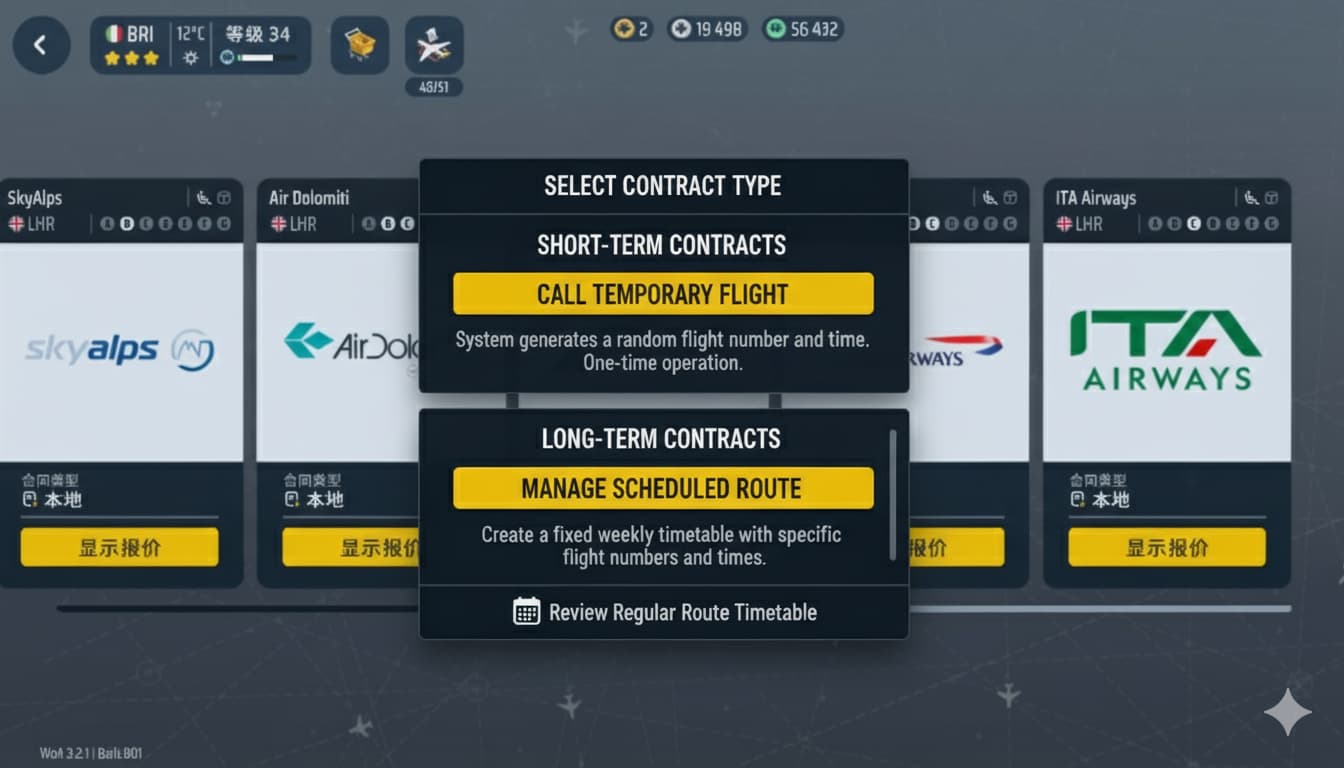
The image is shown below🛬
The new process can be divided into three main stages: Contract Acquisition, Timetable Management, and Daily Operations.
Stage 1: Route Contract Acquisition (Opening the Route)
1. Open the World Map
The player navigates to the “World Map” or a dedicated “Route Management” screen.
2. Select Destination and Airline
As in the current game, the player selects a destination city (e.g., London LHR) and then selects a supporting airline (e.g., British Airways - BAW).
3. Sign the Route Contract
The interface now presents a “Route Contract” instead of an immediate aircraft purchase/lease.
Set Frequency: The player chooses the weekly operation frequency for this route (e.g., Daily - 2 Flights, or Weekly - 5 Flights). Confirm Aircraft Range: The airline specifies the accepted aircraft types for this route (e.g., A320 Family / B737-800). Sign Contract: After spending the required currency/reputation, the route is opened, and the player is automatically prompted to the Timetable Management screen.
Stage 2: Timetable Management (Core Action)
This is the central feature, replacing the old “manual tap to land” process.
1.Access the Timetable Editor
The system either redirects the player or the player manually enters the “Timetable Management” interface.
The left side lists all active routes; the right side shows the weekly schedule for the selected route.
2.Assign Flight Times
Based on the contract frequency, the system provides corresponding flight “slots” (e.g., two slots per day).
Set Scheduled Arrival Time (STA): The player clicks on a slot to assign a Planned Arrival Time for that specific flight number.
Example: BAW286 is scheduled to arrive at 08:00; BAW290 at 18:00.
Optimize Turnaround: Players must plan appropriate time intervals to ensure the aircraft has enough ground time for a successful turnaround (fueling, baggage, passengers).
3. Save the Timetable
Once satisfied with the schedule, the player clicks “Save/Activate Timetable.” The game will now automatically schedule arrivals based on this plan.
Stage 3: Daily Operations (Automation and Challenge)
Once the timetable is active, the game’s daily runtime changes:
1.Automated Flight Generation and Dispatch
•When the real-time game clock approaches the flight’s Scheduled Arrival Time (STA), the system will automatically generate the corresponding airline, aircraft type, and flight number as an inbound arrival.
•No more manual tapping to land. Flights will now appear on your radar or in the air near their scheduled time.
2.Gate Competition and Management
•The player must ensure that an appropriate and available gate/stand is ready for the aircraft when it arrives.
•New Challenge: If a flight arrives on time but no gate is available, the aircraft will enter a holding pattern, resulting in a delay.
3.Ground Service and Turnaround
• Ground services function similarly to the current game, but the player’s speed and efficiency directly determine the flight’s on-time departure.
•Once service is complete, the aircraft automatically departs with its corresponding outbound flight number (e.g., BAW287).
4.On-Time Performance (OTP) & Consequences
•The system calculates the route’s On-Time Performance (OTP) based on deviations from the scheduled times.
•High OTP: Increases the airline’s satisfaction and grants higher revenue.
•Low OTP: Leads to reduced revenue or may even cause the airline to demand schedule changes or cancel the contract, adding operational pressure.
Why is this a good idea?
Just like the ground dispatching system to be updated, you can still follow the original single mode or select the route mode.
The core gameplay loop shifts from “quick service clicks” to “efficient planning and time management,” solving the monotony of single-aircraft, single-turnaround operations.
Players can not only obtain higher economic returns, but also deeply experience the complexity and strategic nature of airline operations, upgrading WOA from a “flight simulator” to an “aviation ecosystem manager”.

Optional: Image or reference
①"Call Temporary Flight" (The current gameplay remains unchanged)
②"Manage Scheduled Route"