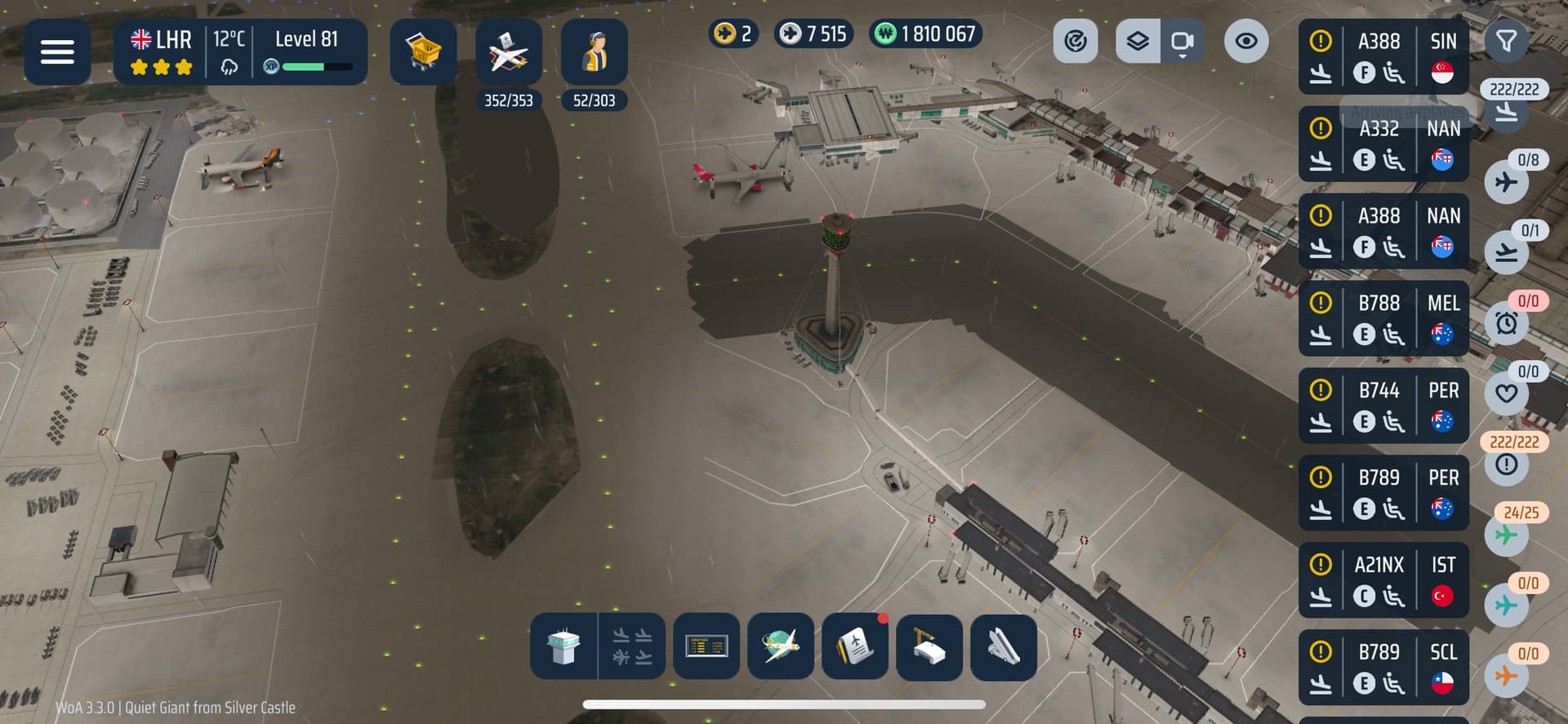
I have been testing the scheduler for some time now and have tried to figure out how it works. It is easy to use (thanks also to @Thephatrican’s stream). The search bar is extremely helpful. I have no complaints about the basic structure. It is well thought out.
Unfortunately, when using Scheduler on a daily basis, I don’t know whether the following is a bug or simply not fully developed yet. In order to describe everything clearly and make suggestions for improvement afterwards, I will first describe my process.
I open the game → All aircraft in the scheduler are marked with a heart as favourites
Delivery Manager is deactivated, the rest is activated.
At least two aircraft are marked for each gate in the scheduler.
I will refer to aircraft 1 / 2 in the following. (1 = 1st position in the scheduler, 2 = 2nd position in the scheduler, etc.)
I have to assign each aircraft to the gate manually, as it is not assigned automatically despite the scheduler.
The bar on the right is then empty.
As soon as aircraft 1 is at the gate, aircraft 2 is displayed on the right in the bar as (!), even though the gate is still blocked, logically.
I have to click through many (!) again and again, because otherwise I cannot see whether the gate is free or not.
2a. The delivery manager is activated → Aircraft 2 is assigned to another free gate.
Now to the points that I would like to see improved/optimised.
All aircraft in the scheduler are automatically assigned to the gate (even without Delivery Manager) and no aircraft appears in the bar with (!).
Aircraft in the bar (!) make the whole thing confusing if the gate is not free anyway.
Even with Delivery Manager, I would at least like the option to turn on or off whether my planned aircraft can be assigned to another gate.
Assign areas and/or terminals to a specific airline (this means that the same airline is always at the same terminal but at different gates).
Assign areas and/or terminals to the ‘player aircraft’ / ‘fleet’ group (this means that a player/fleet aircraft is always at the same terminal but at different gates).
Player aircraft and aircraft from your own fleet should be displayed differently in an existing player contract (in the scheduler). The time displayed in the scheduler is irrelevant, as you don’t know when the aircraft will return. (also see points 3/4)
I look at the finished scheduler and use the filter at the bottom left (to hide empty gates), but the view is not saved. It would be good if such a view were saved for the session, just like in the ‘Planner’; the view should remain the same when leaving the scheduler. (the viewed gates keep slipping away)
As I said, I don’t know if this is a bug or if the scheduler needs to be optimised. But I’m sure that with a few changes, it could be a big improvement for the game. Thanks for the introduction!
And apologies to @ukplanespotter757 if the topics overlap in the forums or if you think it belongs more in the ‘bug’ area.
I’ve put it in general discussion, as I’m not sure what would be best for it myself and I think this is the best suited place for the time being, at least until we know more about the scheduler and how it works.
I wholeheartedly agree. Everything with the schedule works great as far as I can tell, except having to constantly click through all the contracts on the right that need attention. At an airport like LHR and my 250+ scheduled contracts so far, it gets to be a LOT.
A possible explanation for having aircraft visible in the bar when the scheduled gate is occupied can be that this is a “manual override”. It offers a means to reassign it to a different gate when
● you don’t want to wait for the occupying aircraft to finish
● the occupying aircraft is waiting for a renewal acceptation (which can take a while)
I agree with the idea that they should have a feature where you could select not only one stand for a contract, but several stands or a whole terminal (for example, stands 4-17 for Southwest at SAN). This would not only aid the realism factor but almost introduce a sense of ‘controlled flexibility’, as if a specific gate is taken for a specific contract, but another is free inside the designated area, it will take that one. I still like the idea of having individual gates for contracts too, as at some airports some airlines only get one gate (For example only gate 18 for Frontier at SAN).
Couple additional ideas for the scheduling system:
They could make a feature where if an if an aircraft is almost done handling, the aircraft that has the gate next can land ‘early’ which would streamline efficiency and get more aircraft on the ground quicker. My only concern is this could create ‘traffic jams’, so it would have to be implemented correctly.
(This has been suggested in the past, but I feel like this could work good with the scheduling system). Having different slots/cards for the beginning and end of an aircraft’s handling could be very helpful to making an airport feel more full. How it would work is, for example, you have an aircraft land, it gets deboarded and cleaned, and then you can make it wait at that stand for a designated period of time before it boards and departs. This could give a big sense of control, and would add realism, because airlines actually do this in real life.
Right, but if I don’t touch them, I think the arrival manager won’t land them. Am I mistaken? I would love to be and find out that it actually will land them if I wait.
I agree the setup for it is very easy to do, but then after that it’s bit of a mess tbh seems like it’s only designed to have one aircraft at one gate only. So no idea if patch would work or flight schedule will have to be redesigned again. Also I have over 100 contracts missing should have 352 contracts as you can see from 2nd image but as the 1st image shows with arrivals, ground and take off I’ve only got 231 contracts.
See my comment above, I have missing contracts, You should see if some of yours are missing as well. I have some missing that assigned to the gate but nothing can be done unless I cancel all flight schedules and go back to doing it manually.
Are they already enroute to/from another destination? Or, do they only show in the counts if they have an available stand (isn’t the stand count at LHR like 200-something?
I agree the flexibility would be a massive game changer for it. And like the idea of arriving early, they can be made to wait in the taxiway aswell to make it feel even more immersive
I left the game for 24hrs so everything would be ready and that’s when I realised I had more then over 100 contracts missing, They would be ready to land but can’t as they have disappeared.
I’m Really impressed with the tool so far. Just would like to avoid having to reconfirm would rather it just run as per the plan but overall it is has made my terminal application so much easier for real world ops. Thanks and well done!
The scheduler’s got a lot of potential, but in current state there are too many major issues for it to be useful.
First of all, as others have already pointed out, it only seems to work with the first plane assigned to a stand. Planes assigned as 2nd, 3rd in line, just get strewn all around the airport with zero regard to their assignments. Whether it’s a bug or some weird mechanic at work, it just beats all the purpose of using the planner, so I hope it can be fixed.
Moreover, if you’re an efficiency freak like me, we really really desperately need the ability to prioritize particular stands rather than just flights or plane sizes. I need the stands that are closest to runway exit to be rolling non-stop rather than wait empty until 15 planes bound for other parts of the airport land because the manager assigned them first.
That said, I still see the scheduler as a tool with big potential for streamlining the work of delivery/approach managers while giving the player more strategic control, so fingers crossed.
I was travelling last week, and we did this. Arrived like 30 minutes early and the gate we were supposed to be at was still occupied. I do think landing aircraft early could work with the scheduler, but it would have to be toggleable (to avoid backlogs at places like SXM and INN) or configurable in some way. Maybe, when the aircraft that is occupying the gate is done being serviced is when the next aircraft is queued for landing. But, that would have to require the game to be able to handle on the ground gate assignments/switches, because an issue could present itself if, for example, an aircraft lands to move to a gate but the gate its supposed to be going to is occupied by a plane waiting for contract acceptance, then you just end up with a plane on the ground in the way of every other plane.
I think it could work, but it would need some changes to the way the game works, and I’m not too sure how feasible that is.
Fair enough, but it means I have to manually confirm all the stand assignments every time, picking the plane from the list of 200+ contracts on the right, correct?
… and again this beats the purpose of using the planner in the first place